 GameSpark
GameSpark
GameSpark
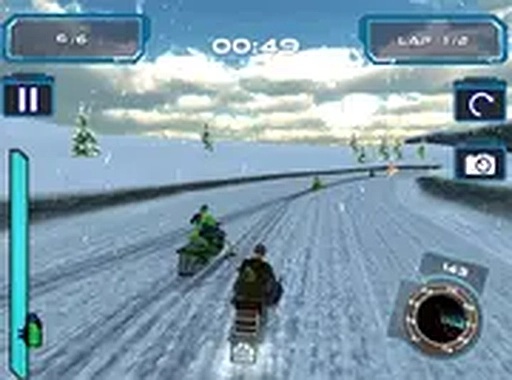
Snow Storm WebGL Racing Challenge is a family-friendly arcade racing game that delivers smooth 3D graphics via WebGL. The controls are responsive, and the icy tracks provide a fun challenge. Coin collection and speed boosters add strategic depth. Multiplayer mode allows racing against friends, and the game runs without downloads. It is a great choice for casual racing fans.
Snow Storm WebGL Racing Challenge is a family-friendly arcade racing game that puts players behind the controls of a snowmobile racing across icy, snow-covered tracks. The game uses WebGL technology to deliver smooth 3D graphics directly in a browser without any downloads. The core objective is to navigate slippery terrain, collect coins to increase score, and grab speed boosters for a temporary burst of speed. Stop signs appear on the track and will damage the engine, ending the race if hit. The game offers both single-player and multiplayer modes, allowing players to race against friends or practice alone. Full screen mode is available for a more immersive experience. Designed for desktop computers, the controls are responsive using a keyboard or mouse. Snow Storm WebGL Racing Challenge combines skill, quick reflexes, and strategic use of power-ups.
Players use keyboard arrow keys or WASD to steer the snowmobile left and right across the track. Coins appear along the path and can be collected to build score. Speed boosters provide a temporary increase in speed, helping to cover more ground quickly. Stop signs must be avoided because hitting one destroys the engine and ends the race. In multiplayer mode, players can compete against friends for the best time or highest score. The game supports full screen mode for a larger view. Practice on the slippery surfaces improves control and reaction time. The game is easy to learn but offers depth for players who want to master the tracks and achieve higher scores.
Game features include 3D snowmobile racing with realistic snowy environments. Multiplayer mode allows players to race against friends for added competition. Coin collection adds a scoring element to each run. Speed boosters provide temporary bursts of speed. Full screen support gives an immersive view. The game runs in a browser with no downloads required, making it accessible on any desktop computer.
To succeed, focus on maintaining control on the slippery surfaces. Practice steering gently to avoid overcorrecting. Prioritize collecting coins to maximize score. Use speed boosters strategically, especially on straight sections where control is easier. Always watch for stop signs ahead and steer clear well in advance. In multiplayer mode, learn the track layout to find the best lines. Regular practice improves reaction time and helps achieve higher scores.
Colorful 2D stickman racing with fun upgrades and offline play. Great for casual gamers of all ages.
A charming blend of action and pet care. Fun for all ages with a unique microscopic setting.

A cheerful and accessible rhythm game with catchy songs and simple controls. Perfect for casual fun.

Relaxing fishing game with smooth controls and family-friendly fun. Great for quick sessions.
A clever puzzle game with fun characters and strategic power-ups. Great for family game time.
A fun and safe racing game with great bike customization and smooth controls.
Engaging 3D driving game with responsive controls and varied missions. Free and easy to play.
Quick Drive Racing offers fast, obstacle-filled driving fun with simple controls and family-friendly content.